
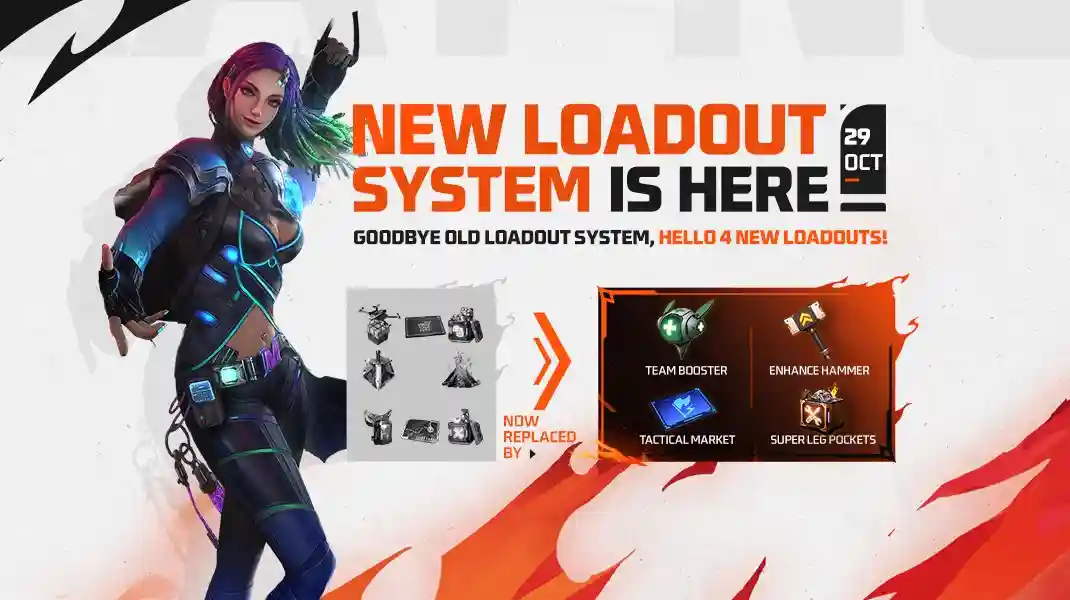
Garena Free Fire is about to level up the battle royale experience with the eagerly awaited OB51 update, bringing a slew of new gameplay features, characters, and events for players around the globe. This patch promises a major shift in strategy as the new character Nero makes his debut, equipped with a distinctive skill that boosts team play and introduces a powerful tactical edge in combat scenarios.
Alongside Nero, fans will discover enhanced weapon tuning, updated sound design, and revamped loadouts including unique items such as the Enhance Hammer, Tactical Market, Cyber Barricade, Smoke Vortex, and Super Bonfire that enrich every match. The addition of new vehicles like the rideable Super Board, improved revival points, and fiery-themed safe zones all work together to immerse players in fresh challenges and vibrant visuals. Check out the Free Fire OB51 Update Apk Download date and time below.
Free Fire OB51 Update Apk Download Date
As anticipation peaks, the official rollout for the OB51 update is set for October 29, 2025, starting at 9:30 AM IST. Here’s a comprehensive guide of Garena Free Fire OB51 update Apk Download on both Android and iOS devices. Follow these steps to ensure you experience all the new features and improvements as soon as the patch is officially released.
Also Read:
- Free Fire MAX Redeem Codes Today July 21 Indian Server Bring Free Rewards
- TEZ FFMIC 2026 Fall Play-Ins: FFC and City Qualifier Teams Revealed
- Garena Introduces Free Fire MAX Transfer Window with Specific Rules
Free Fire OB51 Apk Download Guide for Android
- Open the Google Play Store on your smartphone.
- Type “Free Fire” in the search bar and locate the official Garena Free Fire game.
- If the OB51 update is live, you’ll see an “Update” button—tap it to start downloading the patch.
- Wait for the download and installation to finish.
- Once updated, launch Free Fire and dive into the latest content.
FF OB51 Update Apk Download Guide for iOS
- Open the App Store on your iPhone or iPad.
- Search for “Free Fire” and navigate to the official app’s page.
- If the update is available, tap the “Update” option to begin the download.
- Allow the installation to complete.
- After updating, open Free Fire and enjoy all the new OB51 features.
These steps make sure you receive the most secure and seamless update experience, with all game enhancements delivered directly from official app stores.
 Cricket
India squad for Sri Lanka Tests to be picked this week: Bumrah, Jadeja to return, Washington Sundar doubtful
Cricket
India squad for Sri Lanka Tests to be picked this week: Bumrah, Jadeja to return, Washington Sundar doubtful

















































