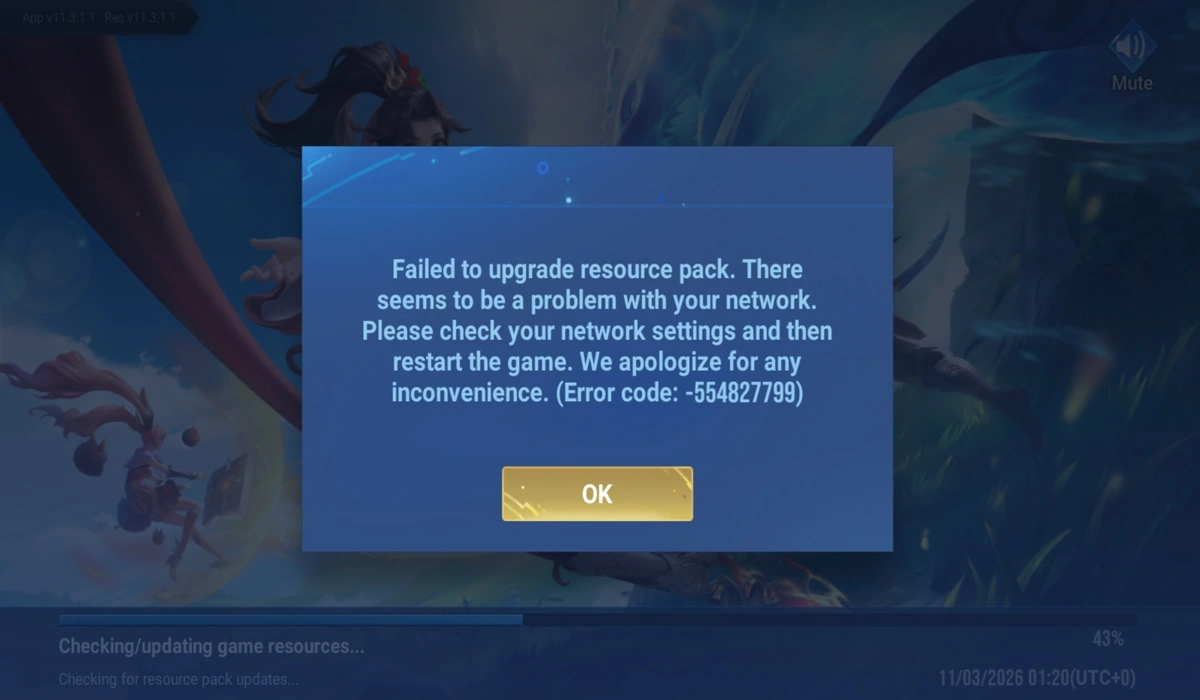
The highly anticipated launch of Honor of Kings in India has finally arrived, but for many players, the journey to the battlefield has hit a temporary roadblock. Despite the game being available for download on the Google Play Store, a significant number of users are reporting a frustrating error: “Failed to Upgrade Resource Pack” (Error Code 554827799).
If you are seeing this message after the initial 400 MB download, you aren’t alone. Here is everything you need to know about Honor of Kings Error Code why this is happening and how to fix it.
Why is Honor of Kings Error Code 554827799 Happening?
The primary reason for this error is likely server timing. While the game client has been made available for download on the Play Store, the dedicated Indian servers may not be fully live yet.
When you open the game, it attempts to “handshake” with the server to fetch the remaining high-quality resource files. If the server isn’t ready to receive requests, the connection fails, resulting in the “Failed to Upgrade” message. With over 2 million pre-registrations, the massive influx of players trying to connect at once can also cause temporary authentication loops.
ALSO READ
- MLBB x Naruto collaboration: Release Date, Expected Skins List, Rewards, and More
- Honor of Kings India Is Now Available on Google Play Store
- Moba Legends 5v5 Master Series Registrations Are Live Now
How to Fix Honor of Kings India Error
While the developers work on flipping the switch for the regional servers, here are the steps you can take to resolve the issue:
Recommended – Since this is most likely a server-side issue, patience is your best bet. Once the official launch window opens fully and the servers go live, the game will automatically begin downloading the resource pack without any manual intervention. Keep an eye on official social media handles for the “Servers are Live” announcement.
Toggle Your Network Connection – Sometimes, a “sticky” IP address or DNS cache can cause the resource fetch to fail.
- Switch from Wi-Fi to Mobile Data (or vice versa).
- Turn on Airplane Mode for 10 seconds and turn it off.
- Restart the game and try the download again.
Restart the Game and Device – A simple restart can often clear temporary glitches. Completely close the app from your “Recent Apps” menu and relaunch it. If the error persists, reboot your phone to ensure all background processes are refreshed.
Clear App Cache – If you suspect the download was corrupted:
- Go to Settings > Apps > Honor of Kings.
- Select Storage and tap Clear Cache.
- Note: Do not tap “Clear Data” unless you want to re-download the initial 400 MB.
Don’t worry – your device isn’t the problem! Honor of Kings Error Code 554827799 is a common “launch day” symptom for games with massive player bases. Given the record-breaking 2 million registrations in India, the servers are simply preparing for the heavy load.
 Cricket
IPL 2026 schedule to be announced on March 12, BCCI breaks silence on delay
Cricket
IPL 2026 schedule to be announced on March 12, BCCI breaks silence on delay

 DRS, March 11: West Asia war threatens IPL 2026, BCCI awards in Delhi & Gambhir's dig at Rohit-Kohli