Free Fire fans are eagerly awaiting the arrival of the highly anticipated OB50 update. The Advance Server for OB50 is currently live, allowing selected players to test out new features, characters, and gameplay changes before the official rollout. Check out the Free Fire OB50 Update Release Date and more information below.
This testing phase is crucial for Garena to gather feedback and iron out any bugs, ensuring a smooth experience for the global player base. The Advance Server will continue its operations until July 24th, 2025, building excitement for what’s next in the popular battle royale title.
Leaked Free Fire OB50 Update Release Date
While an official announcement regarding the exact release date for the Free Fire OB50 update is still pending, leaks and reports from reliable sources suggest that the Free Fire OB50 Update Release Date is July 31st, 2025. Historically, Garena tends to release major updates shortly after the Advance Server period concludes, making an end-of-July launch highly probable. Players should keep an eye on official Free Fire channels for the confirmed date and details about the upcoming content.
Also Read:
- Free Fire MAX Redeem Codes February 15 Indian Server Bring Free Rewards
- Free Fire OB53 Update Release Timeline, Collaboration, and More
- TEZ FFMIC 2026 Spring Format: The Road to the Championship Revealed!
- Free Fire MAX OB53 Advance Server Release Date (Expected) and More
- Free Fire MAX March 2026 Booyah Pass: “Golden Voyage” Unleashed
How to Download and Access the Free Fire Advance Server
Access to the Free Fire Advance Server is exclusive and requires an activation code. Here’s a general outline of the steps involved:
- Register for the Advance Server:
- Visit the official Free Fire Advance Server website ([suspicious link removed]).
- Log in using your Free Fire account (Facebook or Google).
- Fill out the registration form with your name, email, Free Fire Player ID, and region.
- Submit the form. Please note that not all applicants will be selected.
- Receive Your Activation Code:
- If selected, Garena will send you a unique activation code. This code might be sent via email or as an in-game notification. Make sure to check your inbox (including spam) regularly.
- Download the Advance Server APK:
- Once you have your activation code, return to the official Free Fire Advance Server website.
- You will find a link to download the Advance Server APK file. Ensure your device has sufficient storage.
- Install and Play:
- Before installing, enable “Install from Unknown Sources” in your device’s security settings (this may vary by Android version).
- Locate the downloaded APK file and install it on your Android device.
- Open the Free Fire Advance Server app.
- When prompted, enter the activation code you received.
- You can then create a guest account to explore the new features.
Remember, each activation code is typically valid for a single use, and the Advance Server is only available for a limited period.
 Cricket
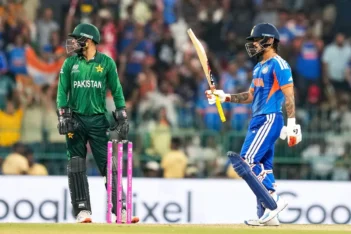
Ishan Kishan smashes 3rd fastest fifty in IND vs PAK T20Is, goes past Gautam Gambhir in elite list
Cricket
Ishan Kishan smashes 3rd fastest fifty in IND vs PAK T20Is, goes past Gautam Gambhir in elite list