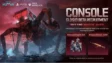
The Battlegrounds is now closed for maintenance as Krafton get everything prepared for this month’s update. Once the maintenance is over, Krafton will push NEW State Mobile December Update. Look forward to a new content and other improvements with this update!
Maintenance Notice – Maintenance Schedule: 12/21, 00:00 – 07:00 (UTC+0)
Updating the Game after the Maintenance:
- If you encounter issues when downloading the update,
please force quit the app or restart your device and try downloading the update again. - The update may become available on store apps later for certain devices.
ALSO READ –
- PUBG Mobile 4.3 Update Download Links And Step-by-Step Guide
- PUBG Mobile 4.3 Update Apk Download Is Now Live For Android Users
- PUBG Mobile 4.3 Update: Release Date, Time, and Exciting New Features
- PUBG Mobile KR 4.3 Update Apk Download: A Step-by-step guide
- PUBG Mobile 4.3 Update To Bring A18 Royale Pass
- Is the PUBG Mobile Lite 0.28.0 Update Finally Coming?
If the update button is not showing properly on a store app, follow the steps below to download New State Mobile December Update.
Google Play Store
- Go to [Google Play] -> Search [NEW STATE MOBILE] -> Tap the [Update] button to download the update.
- If you encounter issues while updating the game, go to [Settings -> Application -> Google Play Store -> Storage -> Delete Cache].
Galaxy Store
- On the Galaxy Store, search for [NEW STATE MOBILE], then tap the [Update] button to download the update.
- From the Galaxy Store home screen, tap [Menu -> Update] and download the update for [NEW STATE MOBILE].
- If you encounter issues while updating the game, go to [Settings -> Application -> Galaxy Store -> Storage -> Delete Cache].
Apple App Store
- On the App Store, search for [NEW STATE MOBILE], then tap [Update] to download the update.
- Tap the Profile icon or your Profile picture (upper-right), then scroll down to see pending updates. Find [NEW STATE MOBILE] and tap update to download the update.
- If the update button is not appearing even after a new version of the app is available, close the App Store and then restart the app.
Follow
Editor's Pick
 Cricket
After RR, RCB to have new owners as Birla group-backed consortium buys IPL champions
Cricket
After RR, RCB to have new owners as Birla group-backed consortium buys IPL champions
Top Stories